
eagL / docs
eagL documentation
Everything between paying and having a working desk. eagL activates offline and stores nothing on any server, so this whole page describes things that happen on your Mac.
Requirements
An Apple Silicon Mac (any M-series chip) running macOS 11 or later. Intel Macs, Windows and Linux are not supported and are not planned; eagL is compiled for one target so the order book, the model and the interface are tuned against known silicon. Venue accounts are yours: Kalshi, Polymarket, PredictIt or Coinbase, whichever you use.
Download and install
The moment payment clears, the verified completion page offers eagL_1.0.3_aarch64.dmg and your signed .eagl-license activation file. Open the DMG, drag eagL into Applications, then eject the disk image and launch eagL from Applications — opening it from the disk image leaves macOS running a temporary read-only copy that cannot activate. Do not install from any third-party mirror.
Expected on first launch
If macOS blocks the first launch
eagL is distributed directly rather than through the App Store, so macOS shows this once. It is not a malware detection — macOS is saying it has not checked the app, not that it found anything. Your download is the signed build from this site.
Install it before you open it. Clicking Open Anyway opens whichever copy you launched. If that copy is still inside the disk image, macOS runs it from a temporary read-only path and eagL cannot activate. Drag it to Applications and eject the disk image first.
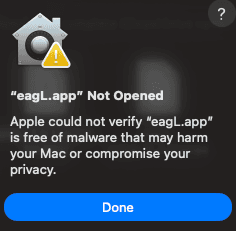
- 01Install, then ejectDrag eagL into Applications, then eject the eagL disk image. Do not run it from the disk image — macOS runs that copy from a temporary read-only location and the app cannot start properly.
- 02Open it from ApplicationsmacOS shows the dialog on the left. Click Done.
- 03Open System SettingsApple menu → System Settings → Privacy & Security.
- 04Scroll to SecurityFind "eagL.app was blocked" and click Open Anyway.
- 05ConfirmEnter your login password or use Touch ID. eagL launches.
Activation
Launch eagL, choose .eagl-license file, and select the downloaded activation document. The license is Ed25519-signed and your Mac verifies it locally; there is no account to create and no activation server to reach. Keep a private backup of the license file, and keep your delivery email: its link returns both the app and a fresh copy of the license at any time.
Connecting venues
Venue API keys go into the macOS keychain and nowhere else. The local sidecar reads them over loopback; they never cross the network to any eagL server, because no eagL server exists. Removing a key from the keychain removes eagL's access with it.
Paper first, live behind a switch
The build ships read-only and paper-first. Live order placement stays off until you enable it yourself behind a kill switch, live orders are limit only, and the risk gate checks the emergency stop before anything else. Polymarket execution does not exist in eagL at all; the reasons are on the Polymarket page.
Updates and the license
$499 buys the application outright plus every update released in the following 12 months. Updates arrive inside the app: open Settings and choose Check for Updates. Each release is cryptographically signed and verified on your Mac before it installs, and installing one keeps your local history. When the update window ends, the build on your Mac keeps working exactly as it did that morning; nothing expires and nothing phones home to check.
Support
Email orders@eagl-app.com or eaglapp@proton.me from the address you paid with, including app version, macOS version and reproducible steps. Never include API keys, wallet secrets or raw credential exports. If a download fails or a charge duplicates, the same address fixes it.
Related reading
All of this ships inside eagL.
$499 once, for Apple Silicon Macs. No subscription.